Sales Order Management for Custom Manufacturing Success

Sales order management pulls scattered order entries into one orchestrated process. It trims endless manual steps, accelerates deliveries, and keeps customers smiling.
Why Sales Order Management Matters
Custom manufacturers know the pain of juggling spreadsheets, email threads, and paper slips. That patchwork approach hides extra costs and pushes deadlines out of reach.
A purpose-built order hub brings your e-commerce store, inventory ledger, production floor, and shipping lanes into sync. Suddenly, your data doesn’t trip over itself, and approvals flow without hold-ups.

- Reduced Manual Errors: Real-time data sync across every channel.
- Faster Approvals: Rule-based routing cuts out bottlenecks.
- Clear Stock Visibility: Live inventory status wards off surprise shortages.
Imagine a cabinet maker who manually copies order details into multiple spreadsheets. A missed raw-material shortage can mean hours of rework—and a few lost customer orders.
Industry numbers make the case too. The global Sales and Order Management market sits at $15 billion in 2025 and is on track for a 12% CAGR through 2033, thanks to booming e-commerce and logistics needs. Check the full research at Market Report Analytics.
Without automation, teams can burn through 25% of their week on data entry and fixes. That’s production grinding to a halt and budgets slipping through your fingers. TimberCloud’s intuitive dashboards and instant alerts snap you back on course.
Sales Order Management Market Overview
Below is a quick look at what’s driving this market forward:
| Metric | Value | Implication |
|---|---|---|
| Market Size | $15 billion (2025) | Signals growing investment |
| CAGR | 12% (2025–2033) | Demands scalable systems |
| Industries Affected | Retail, Manufacturing | Broad range of use cases |
This table highlights the scale, growth rate, and sectors where order management is making waves.
Key Pain Points In Manual Processes
When orders flow through manual systems, hidden costs pile up and throw off your margins. Small errors often lead to expensive surprises down the line.
- Data mismatches force multiple rounds of re-entry and reconciliation.
- Slow sign-offs stall order fulfillment and dent customer trust.
- Inventory inaccuracies trigger last-minute rush orders and empty racks.
Spotting these friction points early means you can shift from firefighting orders to fine-tuning operations.
In the next sections, we’ll unpack core concepts, chart detailed workflows, explore must-have features, share a hands-on implementation checklist, and dive into a TimberCloud success story that slashed cycle time and boosted accuracy. Stay tuned.
Understanding Sales Order Management Concepts
Picture your sales order process as an orchestra warming up before a big performance. Every section—e-commerce, inventory, production, shipping—needs to come in at precisely the right moment. When they do, the result is a seamless, well-timed delivery rather than a cacophony of missed cues.
Order Orchestration As A Conductor
Just like a conductor’s baton, order orchestration sets the pace for every downstream task. Once an online order hits your system:
- Inventory is signaled to reserve stock
- Production scheduling kicks off custom-part creation
- Shipping workflows prepare labels and dispatch dates
That simple baton pass keeps each department in sync and slashes the risk of delays. No more guesswork—everyone knows exactly when to jump in.
Relays Of Fulfillment Engines
Fulfillment engines work much like a relay race, passing critical data smoothly from one runner to the next. Here’s how it plays out:
- Confirm order details and payment
- Reserve inventory and check raw materials
- Generate production instructions and cut sheets
- Pick, pack, and ship the final product
By defining these handoff points clearly, you cut cycle times and hold every team accountable for their leg of the race.
Growth Of Order Management Market
Order management platforms have become a must-have in retail and manufacturing. The market sits at a robust $3.7 billion in 2024 and is on track to hit $7.5 billion by 2031 at a 10.5% CAGR. Learn more about market forecasts on 6Wresearch.
Key Insight Automating order flows can reduce errors by up to 20% and improve throughput by 30%.
Omnichannel Integration And Traffic Lights
Think of omnichannel integration as a city’s traffic-light system for data.
- Green Light: Orders flow freely between sales channels and your back-office
- Yellow Light: Flags warnings like low stock or approvals needed
- Red Light: Halts processes until issues (e.g., address mismatch) are resolved
| Light | Function | Benefit |
|---|---|---|
| Green | Auto-sync orders | Faster cycle times |
| Yellow | Exceptions and warnings | Early issue detection |
| Red | Holds to prevent errors | Avoids mis-shipments |
With everyone “reading” the same signals, you avoid costly mix-ups and keep operations humming.
Concrete Example With Custom Furniture
Let’s say a customer orders a bespoke dining table. Here’s how the flow looks:
- E-commerce captures wood species, finish, dimensions
- Fulfillment engine reserves the exact lumber batch
- CNC cutting schedules update with that order’s specs
- Packing instructions adjust for crate size and weight
This unified approach ensures the color swatch on the website matches what hits the shop floor. One mismatch here—wrong finish or missing hardware—and you’re right back to the drawing board.
Next up, we’ll map out the entire sales order workflow in detail, step by step, so you can see exactly how each piece fits together.
Mapping Sales Order Workflows
Every custom order carries its own story. From the first customer inquiry to the moment the package lands at the dock, each handoff can introduce friction.
Imagine a client asking for a walnut dining table with intricate carvings. When you break that journey down, you find steps like capturing specs, running approvals, scheduling production, and preparing shipments. Tracing these handoffs uncovers the points where delays or errors can creep in.
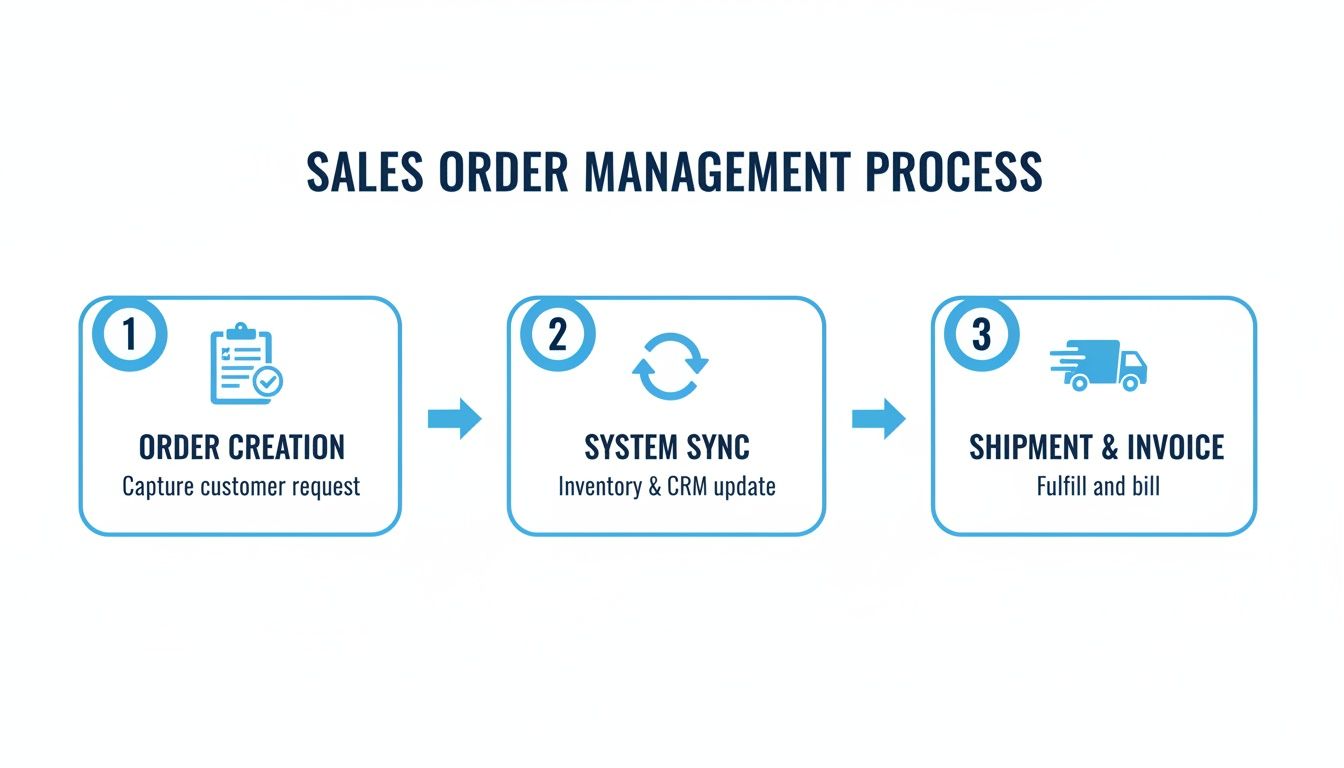
This visual lays out three core phases—order capture, data synchronization, and shipping confirmation—and shows how syncing them cuts cycle time and mistakes.
Key Workflow Stages
Breaking the journey into clear phases helps everyone know who’s responsible and when.
- Order Capture: Sales collects customer specs, dimensions, and deposit.
- Data Sync: System reserves raw materials and aligns inventory data.
- Production Kickoff: Shop floor receives cut sheets, work orders, and schedules.
- Shipping Confirmation: Logistics books carriers and notifies the customer.
Each milestone ties to specific teams and tools, giving full visibility into where hiccups might occur.
Handling Exceptions Early
Simple data gaps or slow approvals can stall an order for hours. Say a finish color code is missing—the CNC programmer stops, and someone has to track down that detail.
“Visibility into each exception lets teams address issues before they snowball into costly hold-ups.”
To surface these snags quickly:
- Flag low inventory thresholds in real time
- Route approval tasks through automated workflows
- Alert users when required fields are left empty
This proactive approach stops small mistakes from cascading through production and shipping.
Optimizing Visibility And Control
Bringing every order phase into view gives teams the chance to react before a delay turns into a backlog.
| Phase | Visibility Tool | Benefit |
|---|---|---|
| Capture | Order entry portal | Ensures complete specifications |
| Sync | Inventory dashboard | Prevents stock surprises |
| Production | Work order status | Tracks floor progress |
| Shipping | Shipment tracker | Confirms delivery in advance |
With this side-by-side view, managers can check the status of any order at a glance. That clarity slashes response times and drives continuous improvement.
Identifying Bottleneck Areas
When you map each step, patterns start to emerge. For example, manual quote approvals often add 48 hours to the schedule.
Common red flags include:
- Repeated data corrections in order entry
- Stalled approvals in routing queues
- Unexpected stock variances after reservation
Spotting these trends shows exactly where to introduce automation or extra support.
Actionable Improvement Opportunities
Once bottlenecks are clear, you can design targeted fixes. Try rule-based routing, auto-escalation, or allocating more resources when thresholds are hit.
- Automate data validation to cut re-entry time
- Set up exception dashboards for immediate alerts
- Optimize material planning based on historical lead times
This shift from reacting to refining transforms your order-to-delivery process.
Tracking Key Metrics
If you can’t measure it, you can’t improve it. Keep an eye on:
- Order Cycle Time: Hours from initial request to shipment
- Order Accuracy Rate: Percentage of error-free orders
- On-Time Delivery: Share of orders arriving as promised
Embedding these indicators in your dashboard highlights trends, sets clear goals, and holds teams accountable across sales, production, and logistics.
Sales Order Management Features And Metrics
Effective sales order management ties together scattered tasks and clear benchmarks. When you have both, you can spot friction points and refine your process continuously.
Core Features That Drive Efficiency
A modern sales order system rests on a few fundamental pieces:
- Order Automation Module improves approval routing and removes manual data entry.
- Real-Time Inventory Synchronization updates stock counts the moment a sale happens.
- Customizable Workflows shape order steps to match unique manufacturing rules.
- Analytics Dashboards surface trends, highlight exceptions, and expose slow points instantly.
Below is a snapshot of how these functions translate into tangible benefits:
Comparison Of Key Features And Benefits
| Feature | Business Impact | Key KPI |
|---|---|---|
| Order Automation Module | Reduces manual approvals by 40% | Approval Cycle Time |
| Real-Time Inventory Sync | Prevents stockouts and overstocks | Inventory Accuracy Rate |
| Customizable Workflows | Adapts to specialized order requirements | Workflow Exception Rate |
| Analytics Dashboards | Highlights process anomalies in real time | Dashboard Utilization Rate |
When combined, these tools slash errors and speed up end-to-end order handling.
Key Performance Indicators To Monitor
Keeping an eye on the right metrics gives you a real understanding of order health. Start with these three:
- Order Cycle Time: Time from order receipt to shipment.
- Order Accuracy Rate: (Number of error-free orders ÷ Total orders) × 100.
- On-Time Delivery Percentage: (On-time deliveries ÷ Total shipments) × 100.
“Focusing on these metrics turns guesswork into data-driven actions.”
Companies embracing automation often see 30% faster order processing and 20% fewer mistakes. In fact, some report up to $2 million in annual labor savings. For more insights on this trend, check out Jugl’s order management insights.
Putting Metrics Into Practice
Dashboards and alerts make these KPIs impossible to ignore. For instance, you might configure:
- A visual gauge for Order Cycle Time that flips to red when you exceed your target.
- Threshold alerts that keep Inventory Accuracy Rate above 98% across all channels.
- Exception reports that spotlight recurring errors and guide team training.
- Weekly summary emails that call out KPI shifts and notable cases.
By weaving these signals into daily routines, your team shifts from reacting to issues to preventing them. Explore targeted configurations and reporting in our guide on sales order management platform features.
Continuous Improvement Strategies
Metrics should spark small experiments, not sit forgotten in slides. Try these steps:
- Rotate KPI ownership quarterly to spread accountability.
- Run A/B tests on workflow tweaks—compare two approval rules and measure the impact.
- Document each change and log its effects on Order Cycle Time and On-Time Delivery Percentage.
Consider a custom furniture maker who cut Order Cycle Time by 22% after replacing manual approvals with rule-based triggers. Another shop lifted On-Time Delivery to 96% by sending auto-reminders three days before each shipment.
Expert Takeaway: Continuous, small adjustments build up to significant efficiency gains.
By making this cycle of review and refinement part of your culture, your sales order management stays in sync with customer demands and operational realities. Reliable growth starts here.
Sales Order Management Implementation Checklist
Rolling out a dependable sales order management system isn’t a flip-the-switch exercise. It takes deliberate planning and well-defined criteria. This checklist guides custom manufacturers step by step—from nailing down requirements to celebrating a successful launch.
- Define Business Goals and KPIs to align expectations and measure progress
- Map Existing Systems, including e-commerce, ERP, and production schedulers
- Identify Integration Points with inventory, shipping, and middleware tools
- Establish Data Governance Policies to ensure accuracy and compliance
Conduct Data Cleansing
Clean data is non-negotiable. Start by purging duplicates and outdated entries from customer and product records.
Whether you opt for automated scripts or a hands-on review, validate critical fields like SKUs and contact details.
“Data integrity is a top success factor in order management rollouts.”
Next, bring all stakeholders into one room. Workshops with sales, operations, and finance teams help lock down deliverables and curb scope creep.
| Integration Type | Complexity | Benefit |
|---|---|---|
| API Connection | Medium | Real-Time Sync |
| Middleware | High | Looser Coupling |
| Batch Upload | Low | Simple Setup |
Select Integration Strategy
Choosing between an API, middleware, or batch upload comes down to your team’s expertise and timeline. A direct API provides instant updates but requires developer bandwidth. On the other hand, batch uploads can be up and running quickly, then refined into daily or monthly syncs.
- Configure middleware mappings to standardize data fields
- Secure API endpoints with tokens and rate limiting
- Schedule batch jobs during off-peak hours to minimize system load
Document everything up front—API specs, error codes, retry logic—so support teams aren’t left guessing later.
- Test integrations in a sandbox using real sample orders
- Perform end-to-end order simulations to catch exceptions
- Train users on the new interface and workflow changes
- Roll out in phases, beginning with low-risk products
Align Stakeholder Agreements
Before you build anything, get buy-in on scope and milestones. Define a formal approval process for change requests to keep your timeline intact.
“Clear agreements reduce project hiccups and keep timelines on track.”
Leverage a central collaboration tool to log decisions and next steps. After each meeting, circulate a summary to confirm everyone’s on the same page.
- Pitfall: Scope creep can derail schedules
- Tip: Freeze requirements before development begins
- Pitfall: Inconsistent data formats cause sync errors
- Tip: Enforce standardized templates and validation rules
| Phase | Duration |
|---|---|
| Requirements | 2–3 weeks |
| Integration | 4–6 weeks |
| Testing | 3–4 weeks |
| Training | 2–3 weeks |
| Go-Live | 1 week |
Monitor these phase durations closely. A simple dashboard view can alert leadership to any slippage.
Finalize Deployment Plan
A phased rollout focuses on your most critical product lines first. Assign clear go-live responsibilities and set up dedicated support channels.
- Set up live monitoring on order errors and warnings
- Provide a dedicated support line during the first two weeks
- Gather user feedback daily and iterate quickly
“Continuous tuning of alerts ensures the system evolves with your business.”
Review early metrics such as order cycle time and error rates. Adjust alert thresholds to surface only the most urgent exceptions.
Use TimberCloud Platform
TimberCloud pulls e-commerce, inventory, production, and shipping into a single hub. You get built-in analytics, AI plan-to-production features, and flexible APIs—no more jumping between tools.
Its embeddable storefront lets you manage orders without switching platforms. This unified approach cuts errors by 20% and speeds up handling by 30% per industry studies.
Next Steps
Treat this checklist as a living document throughout your rollout. After Go-Live, schedule a post-launch review to capture lessons learned and shape future updates.
If new requirements emerge, loop in TimberCloud support for expert guidance. With these steps in hand, your custom manufacturing shop will unlock smoother order flows and crystal-clear visibility—so you can focus on what you do best: crafting exceptional products.
How TimberCloud Addresses Sales Order Challenges
A mid-sized furniture maker was caught in a loop of stockouts, manual errors, and late shipments. Every order demanded extra hours of checks and corrections, leaving customers frustrated and materials wasted. This real-world example shows how TimberCloud turned the tide.
TimberCloud rolled out a central order hub, rule-driven workflows, and live dashboards. Suddenly, the team had full visibility at every step. The results speak for themselves:
- Frequent stockouts caused by delayed inventory updates
- Manual entry mistakes that triggered rework
- Late shipments from missing approvals
“TimberCloud became our central station, bringing every order into clear view and on time.”
By funneling spreadsheets and email threads into one system, silos disappeared and accurate data took center stage. Order processing shifted from reactive firefighting to a smooth, predictable rhythm.
Unified Order Hub
Think of the unified hub as air traffic control for your orders—directing each request from entry through to shipping. All sales channels converge on one screen, so teams can filter, sort, and act without digging through separate reports.
Users tailor their view to focus on what matters most—whether that’s high-ticket jobs or quick-turn projects. Rule-based workflows then kick in to handle approvals and exceptions automatically. For instance, orders over a set value or those requiring special finishes follow predefined paths. This simple shift cut approval times by 30%, swapping manual checks for instant validations.
- Automated order intake with smart validations
- Conditional routing for approvals
- Exception alerts for missing data
Key Insight Automated workflows cut approval delays by 70% and drive consistency.
With this foundation in place, the shop saw faster throughput and far fewer last-minute surprises. Next up: tapping into live performance metrics.
Real-Time Dashboards
TimberCloud’s dashboard feels like mission control for order flow. Pending approvals, low-stock warnings, and looming delays appear at a glance. Custom widgets let you keep an eye on the metrics that matter right now.
Below is a screenshot of TimberCloud’s dashboard showing real-time order tracking and exception alerts.

With this visibility, managers can step in before small issues balloon. And the impact is clear:
- 40% faster order cycle
- 50% fewer entry mistakes
- 95% on-time delivery rate
When everyone sees the same real-time data, collaboration replaces confusion—and operations transform.
Getting Started With TimberCloud
Ready to leave order headaches behind? Setting up takes just minutes, and you can import existing orders with a single click.
Create your account at TimberCloud to unlock these benefits today.
Follow these steps to move from reactive firefighting to proactive order management—just like our furniture maker.
Integration Guidance
TimberCloud plugs seamlessly into leading e-commerce platforms, ERP systems, and shipping carriers:
- E-commerce: Sync live orders from Shopify or WooCommerce
- Shipping: Automate label creation and carrier booking
These integrations keep stock levels accurate and eliminate manual data entry at every handoff.
Sales Order Management FAQ
Sales order management can feel like juggling too many spinning plates. But with the right tools, you get clear answers on integration, timelines, ROI—and much more. This FAQ cuts through the noise and gives you practical advice you can act on right away.
What Are The Main Benefits Of Sales Order Management?
A dedicated sales order management system brings every order into one place. No more hunting through emails or spreadsheets. Your team sees inventory levels update in real time, so you fulfill orders faster and keep customers happy.
By centralizing orders, you will:
- Slash manual errors and time spent on rework
- Maintain real-time inventory accuracy
- Speed up the order-to-ship cycle
- Boost customer satisfaction
- Lower overall operating costs
With a unified dashboard, you can cut 25% of manual work and free up your team for higher-value projects.
How Do I Integrate Sales Order Management With Existing ERP?
Most solutions offer RESTful APIs or middleware connectors that slot right into your ERP. To keep things smooth:
- Align field mappings before you start
- Run tests in a sandbox environment
- Roll out changes in phases to stay nimble
- Automate error notifications to catch glitches early
This step-by-step approach minimizes downtime and helps you spot issues long before they affect customers.
What Is A Realistic Implementation Timeline?
For a standard rollout, plan on 12–16 weeks:
- Requirements Gathering: 2–3 weeks
- System Configuration: 4–6 weeks
- Integration Testing: 3–4 weeks
- User Training: 2–3 weeks
If you have a complex ERP or need custom hooks, add another 4–6 weeks. Rolling out in stages keeps stakeholders aligned and ensures steady momentum.
How Can I Measure ROI After Deployment?
Focus on a handful of KPIs to see real impact:
- Order cycle time reduction
- Improvements in order accuracy
- Labor hours saved
Translate those gains into cost savings—fewer errors, faster deliveries—and compare against your total setup and running expenses. That gives you a clear payback timeline.
Now you have the roadmap to evaluate, plan, and deploy a sales order management solution that fits your custom manufacturing needs. Here’s how to get started:
- Schedule a demo call with your team
- Map current workflows with key stakeholders
- Kick off a free trial and import your orders
- Reach out to support at the first sign of questions
Take control of your order workflows with TimberCloud, Inc..
Topics
TimberCloud Team
Content Team
The TimberCloud team is dedicated to helping manufacturers streamline their operations with intelligent software solutions.