Shop-floor management software for woodworking shops
Track cabinet, millwork and component jobs through your stations. Keep schedules, QR updates and production status connected to the order.
Production tracking the office and the floor both use
See pending, active, and late work on one production board.
Use the production schedule to see what is coming and where each job needs to go next.
Use station updates and QR scanning to keep the job record current.
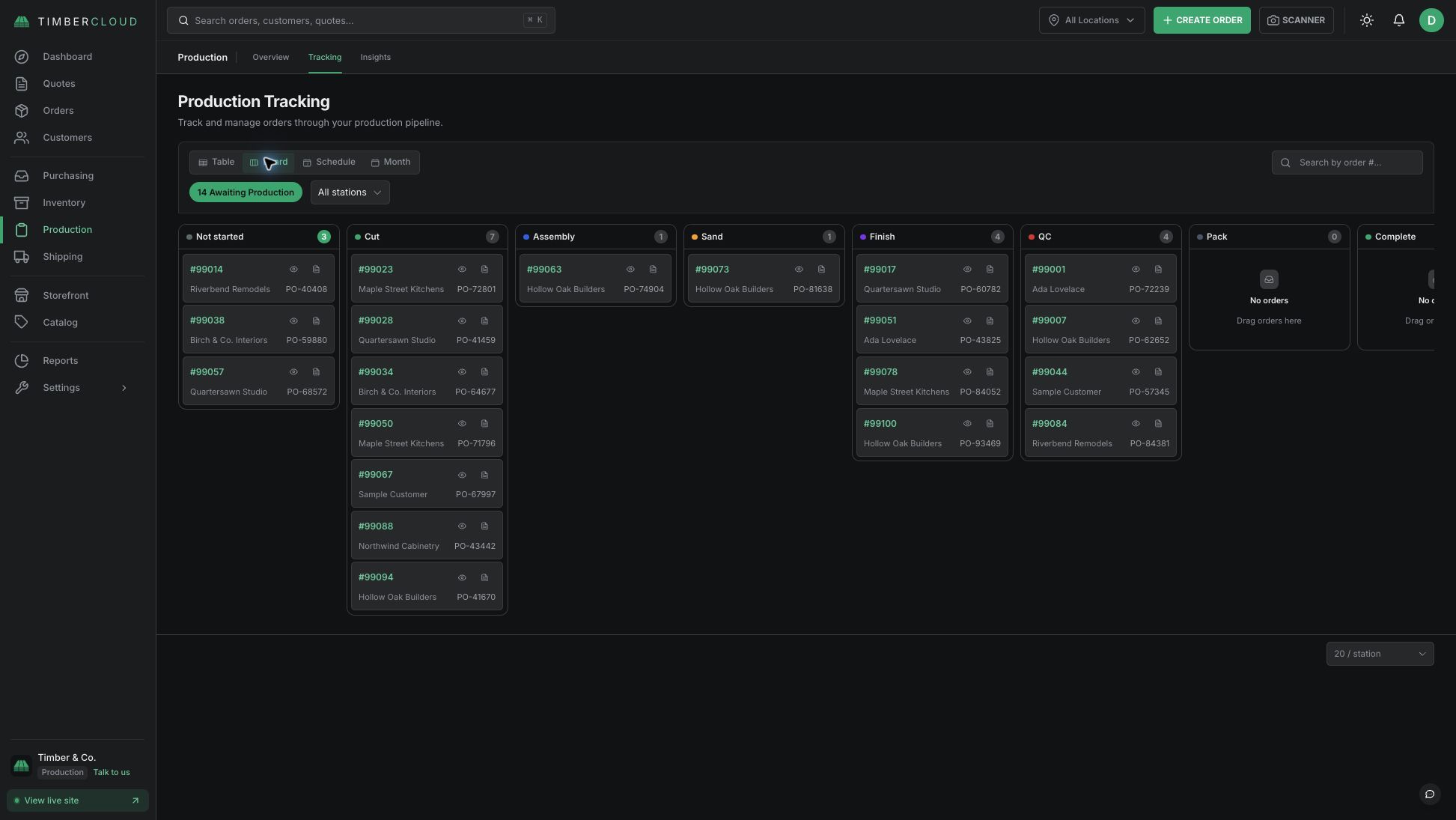
Track woodworking jobs from station to station
TimberCloud's Production / Shop Floor add-on gives cabinet, millwork and component shops a production board, schedule and station updates connected to their orders. Your team can record progress where the work happens and see which jobs are pending, active or late.
Set up the stations your shop uses
Name the stations around your process. For example, a cabinet-component workflow might move through cutting, assembly, sanding, finishing and packing. Map a representative job through the stations and confirm who will update it before rolling the process out to the floor.
Keep the board and schedule current
Use the production board to review job status and the schedule to see upcoming work. Record progress with station updates and QR scanning where available. A useful board depends on the team updating jobs as work moves; agree on that routine during setup.
Carry the order details into production
The woodworking configurator and quoting workflow captures product choices in the order. The separate Build Sheets & CAM add-on prepares supported cut sheets, labels and exports from configured product data. Shop-floor tracking records progress through production. Review the complete order-to-shipment workflow to see how these tools fit together.
What is included in Production / Shop Floor?
- Production board and schedule
- Stations and routing
- QR station updates
- Station timeline, activity log and analytics
- Shop dashboard
Test one real job before rollout
Bring an order, its due date and your station sequence to a demo. Check how the job appears on the board, how your operators update it, and what the office sees afterward. Confirm the devices, permissions and reporting your team requires.
Production / Shop Floor is an optional add-on. Build documentation and inventory use their own add-ons. Compare current pricing and inclusions for the workflow your shop needs.
Frequently asked questions
Yes — but you don't need to pay for extra Shop Floor users. Unlimited Shop Floor users are now included with the Shop Floor add-on.
Operators can scan a job or station QR code to quickly pull up the relevant work and record progress without searching through TimberCloud via our webapp.
Yes. Shops can configure stations around their own workflow — for example cutting, CNC, assembly, sanding, finishing, quality control, packing or shipping.
Yes. TimberCloud shows pending, active and late work so the office and production team can see where jobs stand without chasing updates around the shop. TimberCloud's Shop Floor tool also flags any bottlenecks so you know where jobs are stalling.
Yes. The Shop Floor add-on includes a production schedule for seeing upcoming work and where jobs need to go next.
Yes. You configure TimberCloud around your existing stations and workflow rather than adopting a predefined set of production stages.