Woodworking cut sheets and build files from the order
Carry customer dimensions and options into cut sheets, part labels and supported CAD/CAM exports for your cabinet, millwork or component shop.
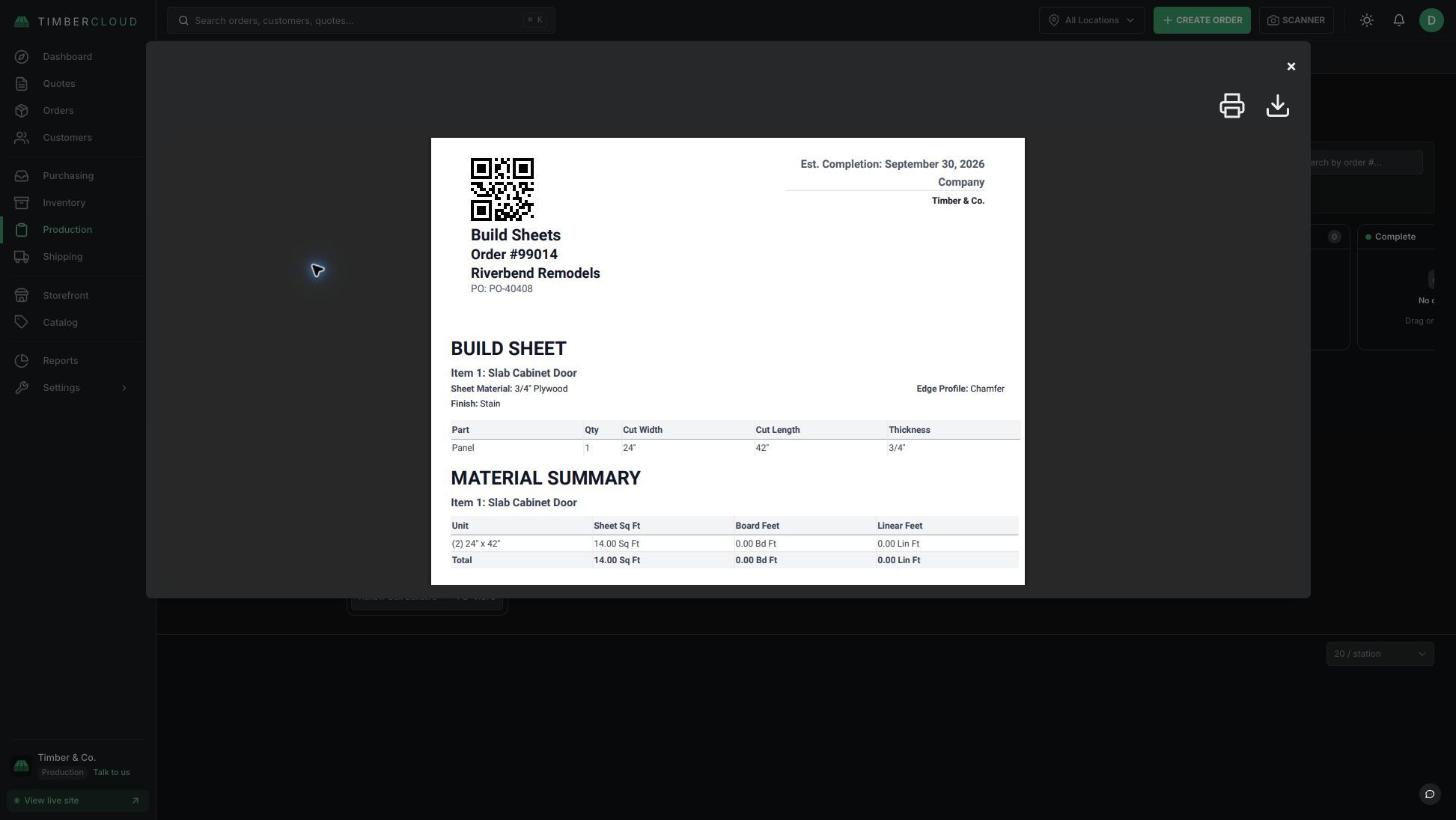
Cut lists and build sheets from the order itself
The specifications the customer chose stay with the order as you prepare build sheets and cut lists.
Print part and packing labels from the same order record your team uses to build and ship.
Export order and part information for supported CAD/CAM workflows. Check the formats and machine output you need in a demo.
From configured order to cut sheet
TimberCloud's Build Sheets & CAM add-on uses the dimensions and options captured in an order to prepare cut sheets, build information and supported exports. It gives cabinet, millwork and component shops a way to carry the customer's selections into production without typing those specifications into a separate blank document.
1. Define how the product is built
Set up the product's dimensions, options, part calculations and output requirements. A cabinet door, drawer box and custom furniture component need different rules. Check a representative product before using its output on the shop floor.
2. Capture the customer's configuration
The woodworking product configurator and CPQ collects the selections used to price the product. Orders entered by your team or placed through online ordering carry those specifications into the next step.
3. Prepare the build information
Generate the configured product's cut and build information, print labels, and prepare the supported export your workflow needs. Review the dimensions, materials and quantities before releasing the job. The production workflow connects that order to shop-floor tracking and shipping, with the applicable add-ons.
What's included in Build Sheets & CAM
- Cut sheets grouped by order or production needs
- Part and packing labels with configurable settings
- Product-specific production details
- Cabinet Vision ORD and CSV workflows
- Machine CSV export
- Kitchen designer cut lists (beta)
- CNC nesting, toolpaths, DXF and G-code (early access)
Check CAD/CAM and machine requirements before setup
A file format alone does not establish compatibility with a particular machine. Bring a sample order, the output file your current software expects, and your machine and post-processor requirements to a demo. Confirm the supported export and review a sample before relying on it for production. CNC output is in early access.
Build Sheets & CAM is an optional add-on. See current pricing and add-ons for the subscription and operational modules that fit your shop.
Frequently asked questions
No. TimberCloud can provide build information and supported exports for your existing workflow. Bring your current software and file requirements to a demo.
CNC output is in early access. We will check your machine and post-processor before recommending a workflow.
Cut sheets can be prepared by order or combined for production. Confirm the available layout and field controls during setup.