Unify Your Workflow With a CRM Order Management System
Think of a CRM order management system as the central nervous system for your business. It's a single, unified platform that ties your customer data directly to every single step of the order journey. It breaks down the walls between your sales team's deep customer knowledge and your production team's fulfillment workflow, creating one seamless command center.
Why Fragmented Systems Break Your Business
Picture this: your sales team has the world's best address book (the CRM), but the warehouse shipping the packages is in a different city with no phone. That disconnect is exactly what happens when your business systems don't talk to each other. It’s a recipe for chaos.
When customer information sits in one database and order details are tracked in another, expensive mistakes are bound to happen. Sales reps are flying blind without a customer's order history on a call, the shop floor can't find a key contact for a clarification, and accounting is pulling its hair out trying to match payments to the right accounts. This breakdown creates a painful domino effect across your entire operation.
The True Cost of Disconnected Data
The fallout from this data gap hits your bottom line, hard. When teams can't see the full picture, you end up with predictable (and preventable) problems:
- Shipping Errors: Manual data entry leads to wrong addresses or incorrect product specs, which means costly returns and unhappy customers.
- Slow Service: A customer calls with a simple question, but your support team has to dig through three different spreadsheets just to find the answer.
- Inaccurate Inventory: The sales team just sold a custom cabinet that your shop can't build for weeks because the materials are out of stock. Hello, backorders and broken promises.
- Lost Opportunities: A sales rep, completely unaware of a customer’s recent frustrating support ticket, makes an awkward pitch to upsell them, souring the relationship for good.
A CRM-driven order management system fixes this by creating a single source of truth. From the initial quote to the final delivery, everyone is working from the same playbook, in real-time.
To put this into perspective, let's look at how these two approaches stack up.
Comparing Traditional vs Integrated Order Management
| Aspect | Traditional Siloed Systems | Integrated CRM Order Management System |
|---|---|---|
| Customer View | Fragmented; sales, service, and operations have separate, often conflicting, data. | 360-degree view; everyone sees the same customer history, preferences, and order status. |
| Data Entry | High-volume manual entry; data is re-keyed between CRM, spreadsheets, and shipping software. | Automated; order data flows seamlessly from quote to production to fulfillment without re-entry. |
| Error Rate | High; prone to typos, outdated info, and communication gaps. | Minimal; automation and a single data source drastically reduce human error. |
| Customer Service | Reactive and slow; agents hunt for information across multiple systems. | Proactive and fast; agents have all order and customer details on one screen. |
| Workflow Efficiency | Inefficient; manual handoffs and constant back-and-forth between departments. | Streamlined; automated triggers move orders through each stage, from sales to production. |
This table shows a night-and-day difference. Moving to an integrated system isn't just a small improvement; it's a fundamental change in how you operate.
The demand for this kind of connected solution is exploding for a reason. The global Order Management Systems market was valued at $2.19 billion in 2021 and is projected to hit a staggering $9 billion by 2033, all thanks to the growing need for automation and smarter e-commerce.
Ultimately, bringing these functions together isn’t just a tech upgrade—it’s a better way to do business. To really get it, you need to understand what an Order Management System (OMS) is at its core. Once you see its role, you'll understand why plugging it directly into your CRM is such a game-changer.
Essential Features That Power Your Business
A great CRM order management system is so much more than a digital filing cabinet. Its real value comes from a handful of specific, interconnected features that can take your chaotic, manual processes and turn them into a smooth, predictable engine for growth. These aren't just bells and whistles; they’re the gears that mesh together to save you time, slash errors, and keep customers coming back.
Think of it like this: without these tools, you're building custom cabinetry with a hammer and a handsaw. It's possible, but it's slow and painful. With the right system, you've got a fully-equipped modern workshop where every tool is designed to work in perfect harmony.
Let's break down the essential features that give you this kind of power.
A Single Source of Truth
The absolute foundation of any good system is centralized customer and order data. This simply means every last piece of information about a client—contact details, every email and phone call, past purchases, and the status of their current order—all live in one easy-to-access place.
When a sales rep gets a call, they should instantly see the customer’s entire history. No more digging through old email chains or bugging another department for a spreadsheet. This 360-degree view leads to smarter, more personal conversations that build real trust and often uncover new sales opportunities.
By bringing all your data together, your team can finally stop reacting to problems and start anticipating what your customers need. Every interaction is informed by the complete customer story, turning a routine service call into a genuine relationship-building moment.
Quoting That Actually Works for You
We all know that manual quoting is a massive bottleneck. It’s painfully slow, filled with opportunities for human error, and requires constant double-checking of material costs and pricing lists. A system with automated quoting takes this complex, frustrating task and makes it simple and immediate.
Imagine your system automatically applying a loyalty discount for a long-term client or adjusting a quote on the fly because the price of a specific wood finish just went up. This kind of automation ensures every single quote is accurate, consistent, and, most importantly, profitable. It removes the guesswork and frees up your sales team to do what they do best: close deals. For a closer look at what this can do, you can explore the various features that drive modern manufacturing.
Connecting Sales to the Shop Floor
One of the most expensive mistakes you can make is selling something you don't have. Real-time inventory synchronization is the crucial link that connects the promises your sales team makes to the reality of what's in your warehouse.
This feature automatically adjusts stock levels across all your sales channels the second an order is confirmed. When a sales rep is building out a custom order, they can see exactly what materials are on hand, preventing embarrassing backorders and broken promises. This direct line of sight means your team sells with confidence, knowing the shop can actually deliver what they promise.
A few key benefits of real-time sync include:
- Preventing Overselling: It puts a hard stop on selling out-of-stock items, which protects your reputation.
- Improving Forecasts: Clean inventory data leads to much smarter purchasing decisions down the road.
- Boosting Customer Trust: Your reps can give reliable delivery estimates on the spot, which customers love.
Finally, automated order status tracking puts power back in your customers' hands by giving them the transparency they've come to expect. Instead of calling your support line for an update, they get automatic notifications as their order moves from production to shipping. This one simple feature can dramatically cut down on inbound support calls and build a rock-solid foundation of trust.
The Real-World Wins of a Unified System
Bringing your CRM and order management together under one roof isn’t just a software upgrade—it's a fundamental shift in how you run your business. Sure, the individual features are great, but the real magic happens when they all start talking to each other. Suddenly, clunky, separate tasks transform into a single, smart workflow.
What does that actually mean for you? Happier customers, a sales team that isn't pulling their hair out, and a much healthier bottom line.
Elevate the Customer Experience
A unified system is the difference between generic service and true personalization. When your team can see a customer's entire history in a single click, they can stop guessing and start anticipating.
Imagine a client who ordered a custom oak desk six months ago calls back. Instead of starting from scratch, your system flags their past purchase, allowing your rep to say, "Hey, I see you got that beautiful oak desk from us. Were you thinking about some matching shelves?" That kind of informed, personal touch turns a simple transaction into a lasting relationship, building loyalty and boosting customer lifetime value.
Unleash Your Sales Team's Potential
Think about all the time your sales reps waste just hunting for information. Chasing down an order status, double-checking inventory with the shop floor, re-typing quote details into an invoice—it all adds up to hours of lost productivity every single week.
A CRM-driven order management system gives them that time back. With every piece of information they need right at their fingertips, your reps can finally focus on what they do best: building relationships and closing deals. They're no longer bogged down by administrative busywork, which means a faster sales cycle and a team that can handle more business without burning out.
The core idea is simple: get rid of the friction. When data flows seamlessly from the initial quote to the shop floor and out to shipping, you turn administrative drag into sales momentum.
Guarantee Data You Can Actually Trust
Manual data entry is a breeding ground for expensive mistakes. One little typo can send an order to the wrong state, generate an incorrect invoice, or lead to the wrong materials being cut for a custom job. These errors don't just cost money to fix; they chip away at the trust you've built with your customers.
By automating the flow of information, a CRM order management system becomes your single source of truth. The data entered during the quoting process is the exact same data used by accounting, production, and shipping. This consistency virtually eliminates human error, ensuring what the customer signs off on is exactly what gets delivered.
For more deep dives into building efficient workflows, check out the articles on our manufacturing and operations blog.
It’s no surprise that the Customer Relationship Management market is so tightly linked to these operational platforms. The global CRM software market is projected to hit $262 billion by 2032, fueled by the growing demand for centralized systems that connect everything from customer conversations to final delivery. You can explore more about CRM market trends on kixie.com.
How It Works in a Custom Manufacturing Shop
While a CRM order management system is a solid move for any business, it becomes a non-negotiable tool in the world of custom manufacturing. Standard, off-the-shelf processes just can't keep up with the endless variables of made-to-order work. Let's walk through how this plays out in a modern custom furniture shop.
This isn't your grandfather's workshop where every order starts with a phone call and a sketch on a notepad. Today's shops empower customers to drive the process themselves, right from their own computer. Picture a client landing on the shop's website, ready to design their dream home office desk.
The Magic Starts With a Product Configurator
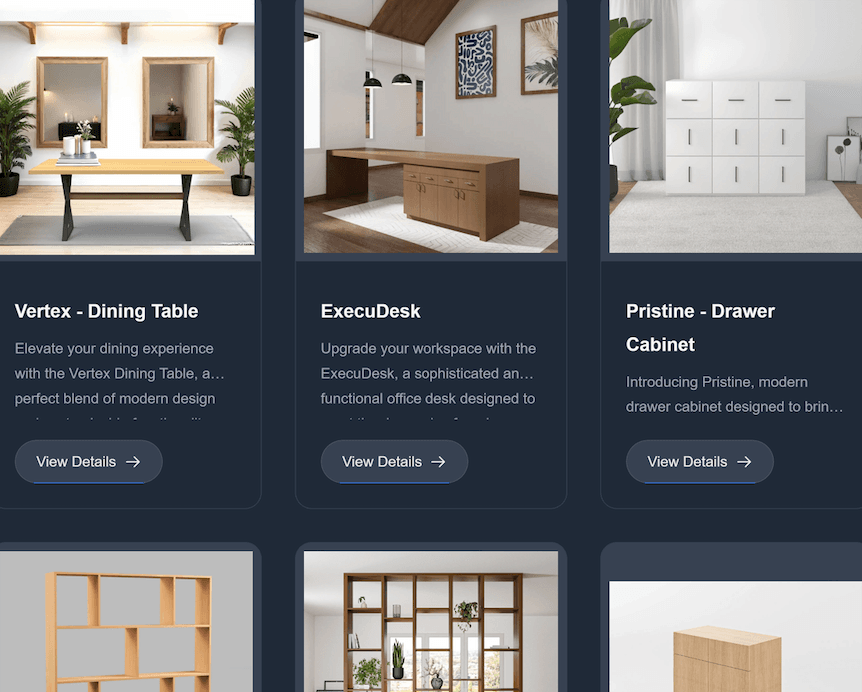
The journey begins with an interactive product configurator. The client gets to play designer—choosing the desk's exact dimensions, picking a wood like rich walnut or light maple, and adding custom features like soft-close drawers or a built-in keyboard tray. With every single click, a 3D model of their desk updates on the screen, giving them a perfect preview of their creation.
But this is far more than just a slick visual aid. In the background, the system is working hard, instantly generating a precise bill of materials (BOM). It knows a 72-inch walnut top requires a specific grade and quantity of lumber, three drawers need six slides and pulls, and the selected satin finish will use a predictable amount of lacquer. This completely automates the BOM, killing the guesswork and making sure the shop has what it needs from the get-go.
This flow is all about weaving together a great customer experience with shop-floor efficiency and accuracy.
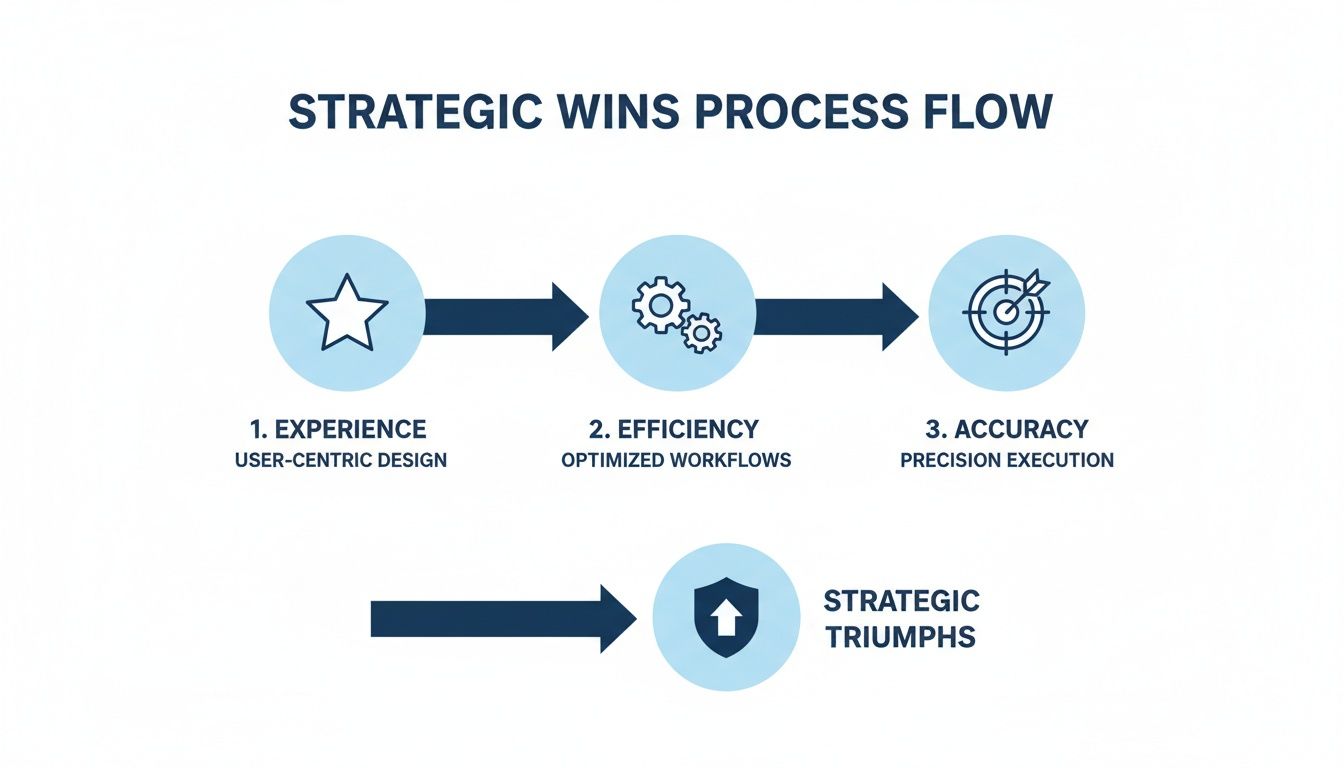
By directly linking the customer’s design choices to the actual production requirements, the system turns a creative spark into a concrete, actionable plan.
From Dynamic Quotes to a Flawless Production Handoff
As soon as the design is finalized, dynamic quoting kicks in. The system is smart enough to pull real-time material costs right from its inventory records. If the price of walnut went up that morning, the quote instantly adjusts to protect the shop’s profit margins. The customer gets a detailed, accurate quote in seconds, without a salesperson spending hours with a calculator and a spreadsheet.
The real game-changer, though, is how the system creates production-ready orders. When the customer hits "approve" on that quote, it doesn't just log a generic sales entry. It translates the entire custom design into a detailed work order that’s ready for the shop floor.
This isn't just a piece of paper; it’s a complete production package that includes:
- Automated Cut Lists: The system generates the exact measurements for every piece of wood, optimized for the CNC machine to minimize waste.
- Assembly Blueprints: A step-by-step guide is created, tailored specifically to the custom components the customer selected.
- Hardware Pick Lists: A precise list of all the screws, slides, and handles needed is sent straight to the assembly station.
By building a seamless bridge between a customer's click and a craftsman's cut, the system eliminates the costly errors that come from manual data entry. It guarantees that the beautiful desk the customer designed online is the exact same one that gets built, making the entire workflow—from initial idea to finished product—unbelievably smooth and precise.
Integrating Your System for Seamless Data Flow
A powerful CRM order management system is one thing, but it truly becomes the heart of your operation when it talks to your other business tools. Think of it like a central nervous system, where data flows instantly between your shop floor, your sales team, and your accounting department, rather than getting siloed in different spreadsheets and programs.
Getting these systems to communicate effectively often requires expert help, like specialized CRM integration services, to build the digital bridges between your most critical software. The end goal is a unified tech stack where information is shared automatically, killing off manual data entry for good and creating a single, reliable source of truth for your entire business.
Connecting Your Digital Storefront
If you sell online, the first and most crucial connection is with your e-commerce platform. When a customer configures and buys a custom cabinet on your Shopify or BigCommerce site, that information needs to land in your CRM instantly.
This one connection automates the entire front end of your sales process:
- New orders pop into the CRM without anyone having to lift a finger.
- Customer profiles are created or updated with their latest purchase history.
- Inventory levels stay perfectly synced between your website and your internal systems.
This keeps the promises you make online aligned with the reality on your shop floor, preventing you from selling materials you don't have and giving customers a smooth experience from the moment they click "buy."
Bridging Sales and Financials
Next up is linking your CRM order management system to your ERP or accounting software. This creates a closed financial loop that’s essential for cash flow. When an order is marked as "complete" in the CRM, it should automatically cue up an invoice in a tool like QuickBooks or NetSuite.
This simple handshake between systems is a game-changer for financial accuracy and dramatically shortens your quote-to-cash cycle. It eliminates the manual errors that creep in when re-typing invoices and gives your finance team a live, accurate picture of revenue at all times.
By syncing these systems, you create an unbroken chain of data from the initial customer quote all the way to the final payment, ensuring every dollar is accounted for with minimal manual effort.
Looking Ahead with AI and Analytics
The final piece of the integration puzzle is hooking up your AI and analytics tools. When you feed clean, centralized order data into these platforms, you start uncovering some seriously powerful insights. AI can dig through purchasing patterns to predict which clients are due for a reorder or pinpoint which product configurations are your most profitable.
This forward-looking approach is exactly why the market for these interconnected systems is booming. The global Omnichannel Order Management Systems market, valued at $2.3 billion in 2025, is projected to hit $8.8 billion by 2034. You can find more details about this market growth on custommarketinsights.com. This explosive growth shows just how critical it is to turn your raw operational data into an intelligent, predictive hub that drives your business forward.
Your Smart System Selection Checklist

Choosing the right CRM order management system is a big deal. It's an investment that will fundamentally shape how you run your shop for years to come. To get it right, you need a clear-headed approach that cuts through the sales pitches and flashy demos. This checklist is your roadmap to finding a platform that actually fits the way you work.
The first step? Grab a notepad or a whiteboard and map out your entire workflow. I mean every single step, from the moment a potential customer asks for a quote to the minute their final payment hits your account. This detailed map becomes your blueprint, showing you exactly where the bottlenecks are and what you need a new system to solve.
Identify Your Must-Have Features
With your workflow mapped, you can build a smart feature list. It's crucial to separate your absolute "must-haves" from the "nice-to-haves." If you're running a custom woodworking shop, a powerful product configurator is probably non-negotiable. An advanced AI forecasting module? Maybe that's a goal for the future.
This simple exercise keeps you focused on solving today's problems, so you don't end up paying for a bunch of bells and whistles you'll never touch.
A common mistake is being swayed by an extensive feature list. The best system isn't the one with the most features; it's the one with the right features for your specific workflow.
Getting this clear also makes budgeting much easier. When you know your core requirements, you can properly evaluate different plans and understand the true value behind various CRM software pricing tiers.
To help you organize your thoughts, here's a quick rundown of the key criteria you should be looking at when evaluating different platforms.
Key Selection Criteria at a Glance
| Criteria | What to Look For | Why It Matters |
|---|---|---|
| Industry-Specific Functionality | Configurators, BOM generation, dynamic pricing tools tailored to custom manufacturing. | Generic CRMs can't handle the complexities of custom orders, leading to manual workarounds. |
| Workflow Automation | Ability to automate quote follow-ups, order status updates, and production scheduling. | This is where you reclaim your time and reduce the chance of human error. |
| Integration Capabilities | Does it connect seamlessly with your accounting software (e.g., QuickBooks), e-commerce platform, and ERP? | A system that doesn't "talk" to your other tools creates data silos and more manual data entry. |
| User-Friendliness | Is the interface intuitive? Can your team learn it quickly without extensive training? | If the software is clunky and hard to use, your team won't adopt it, and your investment is wasted. |
| Reporting & Analytics | Customizable dashboards that track sales cycles, production times, and profit margins. | You can't improve what you don't measure. Good data helps you make smarter business decisions. |
Ultimately, the goal is to find a system that feels like it was built for your business, not one that forces you to change your processes to fit its limitations.
Assess Scalability and Vendor Support
Now, think ahead. Not just next quarter, but 18 to 24 months from now. If your business suddenly grows, can the system handle a 50% increase in order volume without grinding to a halt? A scalable platform grows with you, helping you avoid the nightmare of outgrowing your software and having to start this whole process over again.
Finally, don't overlook the people behind the product. The most powerful software in the world is useless without solid support. Look for a vendor that offers real onboarding help, responsive customer service, and, ideally, a deep understanding of your industry. A true partner will be there to help you get the most out of your investment long after the initial setup is done.
Have Questions? We Have Answers
Diving into new software can bring up a lot of questions. Let's tackle some of the most common ones we hear from shops just like yours.
What’s the Real Difference Between an ERP and a CRM for Order Management?
Think of it this way: an ERP (Enterprise Resource Planning) system is like the factory floor supervisor. It’s focused inward, managing the big picture—accounting, company-wide inventory, HR, and the core supply chain. It makes sure the business itself is running smoothly from a resource perspective.
A CRM-driven order management system, on the other hand, is your sales team's best tool and your customer's best friend. It’s all about the journey from a potential lead to a happy, paying customer. It handles the quoting, the back-and-forth, the order details, and makes sure the customer feels seen and heard. While the two systems often talk to each other, the CRM is squarely focused on everything that touches the customer.
How Long Does It Actually Take to Get This Running?
This is probably the most common question, and the answer is: it's faster than you think. You’re not looking at a year-long project.
For a straightforward setup, especially with modern cloud-based tools, you could be up and running in just a few weeks. These platforms are often built for you to customize without needing a programmer.
If you have a more complex situation—say, you need to pull in years of data from old systems or build a deep connection to your existing ERP—it might take a couple of months. A good partner will walk you through a clear, step-by-step process so you're never in the dark.
Is This Overkill for a Small Shop?
Not at all. It's a common myth that systems like this are only for the big players. In fact, small businesses often get the biggest bang for their buck.
Think about all the manual data entry, quote revisions, and order tracking that eats up your time. A CRM order management system automates that, freeing up your small, agile team to do what they do best: build and sell. It helps you stay organized, look professional, and build the solid foundation you need to grow without the chaos.
Ready to see how an all-in-one platform can tie your sales, engineering, and production teams together? TimberCloud, Inc. was built for custom manufacturers. Discover how TimberCloud can streamline your operations today.
Topics
TimberCloud Team
Content Team
The TimberCloud team is dedicated to helping manufacturers streamline their operations with intelligent software solutions.