Purchase Order Automation Explained Simply
At its heart, purchase order automation is all about using technology to ditch the slow, manual grind of creating, approving, and tracking POs. It’s a move away from tedious paperwork, endless email chains, and that frustrating feeling of not knowing where company money is actually going.
Think of it like this: you're swapping a clunky, folded paper map for a real-time GPS app to navigate your company's spending.
What Is Purchase Order Automation Anyway?
Let's be honest, the old-school way of managing purchase orders is a huge drain on time and resources. It’s a system drowning in paper, wide open to human error, and full of bottlenecks that jam up the entire procurement cycle. Every single step—from an employee filling out a paper form to chasing down a manager for a signature—creates delays and opens the door for mistakes. Lost documents, incorrect data entry, and unapproved "maverick" spending are just the everyday headaches of this outdated approach.
This is exactly where purchase order automation changes the game. It’s not just about turning paper forms into digital ones; it’s about completely rethinking the process for speed, accuracy, and control.
From Paper Chasing to Digital Efficiency
Imagine the old way of buying things as a bucket brigade. Information gets passed down the line manually, and if one person gets distracted or makes a mistake, the whole operation grinds to a halt. Automation gets rid of that fragile chain and replaces it with a smart, connected system that zips information exactly where it needs to go, instantly. For any business trying to stay lean and competitive, this shift is essential.
The infographic below really brings this difference to life, showing the contrast between the old paper-map approach and a guided, digital workflow.
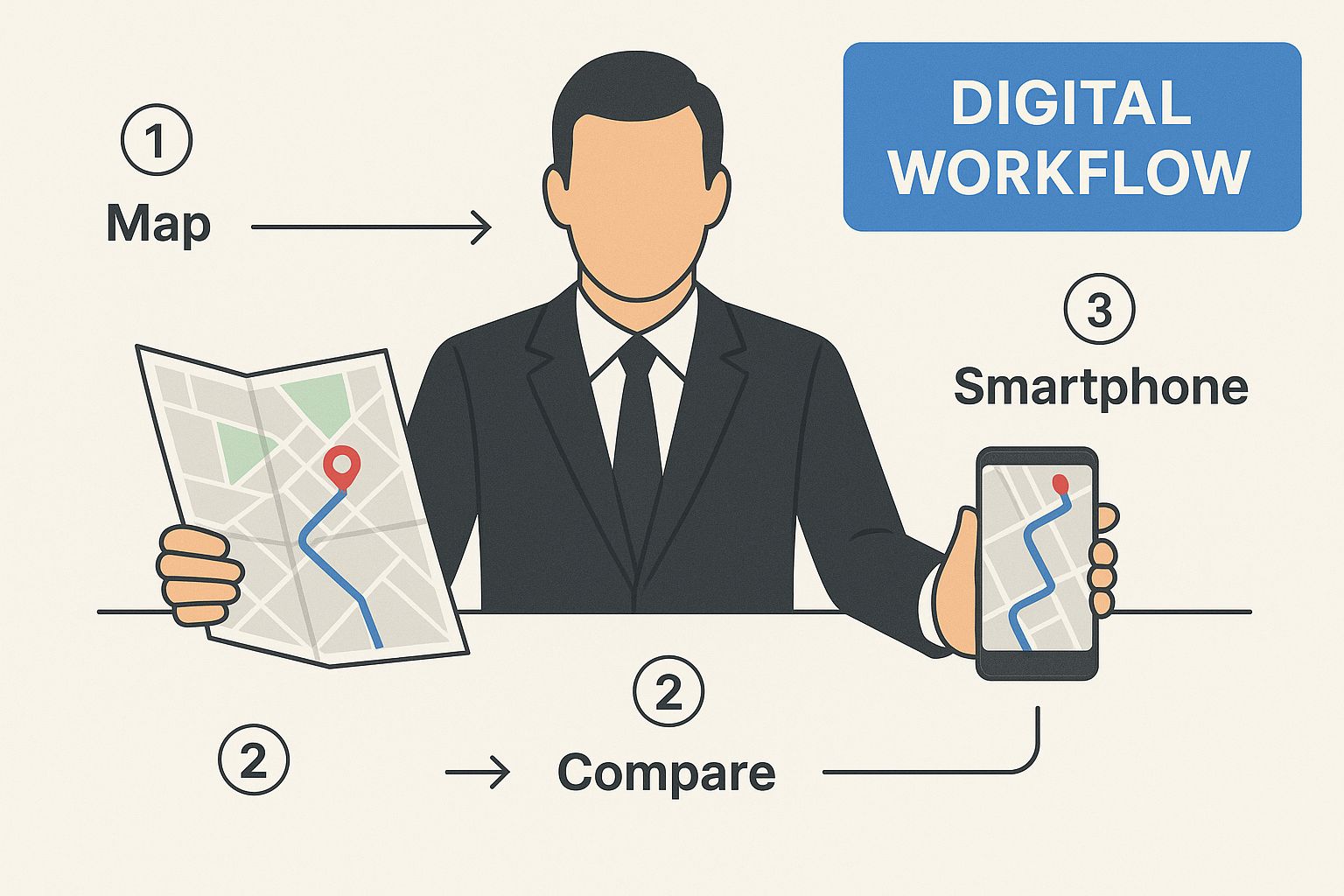
As you can see, automation provides a clear, guided path—much like a GPS—taking all the guesswork and wrong turns out of the process.
To see this transformation in action, let's look at a side-by-side comparison of a typical purchasing workflow.
The Shift from Manual to Automated Purchasing
| Process Step | The Old Manual Way | The New Automated Way |
|---|---|---|
| Request Creation | Employee fills out a paper form or sends an unstructured email. | Employee selects items from a pre-approved digital catalog. |
| Approval Routing | The form is physically walked to a manager's desk or sits in an email inbox. | The request is automatically sent to the correct approver based on rules. |
| PO Generation | The approved request is manually re-typed into a PO template. | A PO is instantly and accurately generated from the approved request data. |
| Vendor Communication | The PO is printed and mailed, faxed, or emailed as a PDF attachment. | The system sends the PO directly to the vendor's portal or email. |
| Tracking & Visibility | Someone has to call or email the vendor for updates. No central view. | A real-time dashboard shows the status of every order at a glance. |
The difference is night and day. One path is full of friction and potential for error, while the other is smooth, transparent, and built for speed.
The Core Problems Solved by Automation
By stepping away from these manual tasks, purchase order automation tackles some major business headaches. These aren't just minor annoyances; they're real issues that hit your bottom line and slow down operations.
Here are the key problems it solves:
- Lack of Visibility: Manual systems are like a black hole for spending data. With automation, you get a central dashboard to see exactly who is buying what, from whom, and for how much, all in real-time.
- Approval Bottlenecks: No more hunting down managers for a signature. Automated workflows route purchase requests to the right person based on preset rules for things like department, dollar amount, or project code.
- Costly Human Errors: From typos in item quantities to using the wrong price, manual data entry is a recipe for disaster. Automation pulls data directly from approved catalogs and vendor lists, dramatically cutting down on mistakes that lead to overpayments or incorrect orders.
- Wasted Employee Time: It frees your team from the soul-crushing admin work of data entry and follow-up emails. This allows them to focus on high-value activities like negotiating better terms with vendors and analyzing spending patterns.
The real goal of purchase order automation is to slash the manual effort, time, and errors tied to old processes. At the same time, it boosts accuracy, transparency, and overall efficiency in how you buy things.
This growing need for a better way is clear in the market trends. The global purchase order software market is pegged at around $15 billion as of 2025 and is expected to grow at a compound annual rate of about 15% through 2033. This boom is happening because companies now see that smart procurement isn't just a "nice-to-have"—it's a must-have for survival and growth. You can explore more about these market trends and what they mean for modern businesses.
The Real-World Benefits of Automating POs
Moving to an automated purchase order system isn't just a technical upgrade; it's a fundamental shift in how your business operates day-to-day. We're talking about real, tangible wins—reclaiming time, getting a firm grip on your finances, and building a much stronger operational backbone. These aren't just small tweaks; the positive effects ripple out across every department, boosting everything from team morale to your relationships with key suppliers.

This change elevates your procurement from a reactive, administrative chore into a proactive, strategic advantage. Let's break down the practical results you can actually expect to see.
Supercharge Team Efficiency and Focus
One of the first things you'll notice is how much manual, repetitive work simply disappears. Think about all the hours your team currently sinks into chasing down paper approvals, manually typing requisition details into a PO, or fielding endless emails about an order's status. Automation hands those hours right back.
Instead of getting bogged down in administrative muck, your team is free to focus on work that actually moves the needle. They can dedicate their time to negotiating better terms with suppliers, digging into spending patterns to find new savings, or nurturing those all-important vendor relationships.
This isn't just about saving a little time here and there. As automation becomes central to your operations, the impact on workload is massive. Reports show it can slash manual procurement tasks by around 40%. That's a huge lift, freeing up your people for more strategic thinking. You can discover more insights about procurement trends and see how this shift is playing out across the industry.
Achieve Significant and Measurable Cost Savings
The financial upside of automation goes way beyond cutting down on labor costs. An automated system brings a level of speed and precision that directly pads your bottom line in a few key ways.
- Eliminate Costly Errors: Manual data entry is a hotbed for expensive mistakes, from wrong quantities to incorrect pricing. Automation pulls data directly from approved requisitions, all but eliminating the risk of overpaying or ordering the wrong stuff.
- Capture Early Payment Discounts: Many suppliers offer a nice little discount for paying invoices ahead of schedule. Manual processes are often too clunky and slow to ever take advantage of them. Automation, on the other hand, speeds up the entire procure-to-pay cycle, making it easy to consistently capture those savings.
- Prevent Duplicate Payments: It sounds crazy, but without a centralized system, it’s surprisingly easy to pay the same invoice twice. An automated platform instantly flags duplicate PO numbers or invoices, stopping this common and costly mistake in its tracks.
By transforming a slow, error-prone process into a fast and accurate one, automation actively stops money from leaking out of your business due to simple human error and inefficiency.
Gain Unprecedented Visibility and Control
In a manual world, trying to track company spending is like assembling a jigsaw puzzle with half the pieces missing. PO automation gives you a single, real-time dashboard where you can see every dollar being spent, who's spending it, and exactly what it's for.
This complete visibility gives you incredible control over your company’s finances. You can set spending limits, enforce budgets automatically, and pull detailed reports with just a few clicks. Instead of waiting for last month's financial statements to see what happened, you're proactively managing spending as it occurs.
This control turns purchasing from a chaotic, decentralized mess into a predictable and well-managed system.
Strengthen Critical Supplier Relationships
Your suppliers are critical partners, and a clunky procurement process can put a real strain on that relationship. Slow, manual POs create friction, leading to delayed payments, confusion over orders, and an all-around frustrating experience for your vendors.
Automating the process makes you a better, more reliable customer. It’s that simple.
- Faster Processing: POs are created and sent to vendors almost instantly once they're approved. No more delays.
- Clear Communication: All order details are standardized and sent digitally, which cuts down on misinterpretations and mistakes.
- Reliable Payments: With faster internal approvals, you can ensure your suppliers get paid on time, every single time.
This kind of reliability builds trust and makes you a customer people want to work with. A happy supplier is far more likely to offer you better terms, prioritize your orders in a pinch, and collaborate on new ideas. This turns a simple transaction into a true competitive advantage.
Finding the Right PO Automation Software
Choosing a purchase order automation tool can feel like trying to find the perfect car. You've got dozens of models, each with its own list of features, and it's easy to get sidetracked by flashy extras that don't actually help you get where you need to go.
The trick is to ignore the noise and focus on the core capabilities that will genuinely make your procurement process faster, more accurate, and more transparent.
Think of it this way: you wouldn't buy a sports car if you needed a pickup truck. Let's break down the essential "engine" components you should look for in any PO automation system.
Automated PO Creation from Requisitions
The journey to an efficient purchase starts the moment someone needs something. The best systems don't just give you a digital form to fill out; they intelligently turn an approved request into a professional purchase order automatically.
Here’s how it works: An employee fills out a purchase requisition, and once it gets the green light, the system instantly grabs all that data—item details, quantities, vendor info, pricing—and populates a PO. This simple step eliminates the soul-crushing task of manual data entry and kills the risk of typos that could lead to ordering 500 widgets instead of 50.
Customizable Approval Workflows
Let’s be honest, getting approvals is often where purchasing requests go to die. A critical feature of any good purchase order automation software is the power to build smart approval chains that reflect how your business actually operates.
You need a tool that lets you set the rules. For example:
- By Department: Marketing requests head straight to the CMO, while facilities requests go to the office manager.
- By Value: Any purchase under $500 gets auto-approved, but anything over $10,000 needs a sign-off from the CFO. No exceptions.
- By Project: All spending tied to "Project Titan" is routed directly to the project lead.
This kind of dynamic routing ensures every request lands in the right inbox immediately, cutting approval times from days down to minutes.
The Power of Automated 3-Way Matching
If there's one feature that acts as your company's financial bodyguard, it's automated 3-way matching. This is your best defense against paying for things you didn't order, things you never received, or just plain incorrect invoices.
The system automatically cross-references three critical documents:
- The Purchase Order: What you agreed to buy.
- The Goods Receipt: What you physically received.
- The Supplier's Invoice: What the supplier is asking you to pay.
If there’s any discrepancy—a wrong price, a shorted quantity, a different item—the system flags it for a human to review. This is "management by exception," and it’s a game-changer. Your team stops wasting time checking every single invoice and only focuses on the ones with actual problems.
Seamless Integration with Core Systems
Your PO system can't be an island. For it to truly be the heart of your procurement process, it has to talk to your other financial software, especially your accounting platform or ERP system.
This isn’t a "nice-to-have"; it's a must. When your systems are integrated, approved invoices and PO data flow directly into your general ledger. This means no more double data entry, fewer errors, and financial reports that are always up-to-date and accurate. When you're checking out different platforms, make sure to review their list of available integrations and platform capabilities to ensure it fits with the tools you already use.
Robust Reporting and Analytics
Finally, a truly great automation tool does more than just process orders—it gives you insight. You need a system with a built-in reporting and analytics dashboard that transforms your spending data into a powerful decision-making tool.
With just a few clicks, you should be able to get a bird's-eye view of company-wide spending, track budgets in real time, and see who's buying what. This is how you spot opportunities to save money, negotiate better deals with your go-to suppliers, and accurately forecast what you'll need in the future.
A Simple Guide to Your Implementation Journey
Getting started with purchase order automation might seem like a huge project, but it doesn't have to be a nightmare. The trick is to break the whole thing down into smaller, more manageable steps. Think of this as your roadmap, guiding you from where you are now—likely buried in manual tasks—to a much smoother, automated workflow.
The most important first step is to take a good, hard look at your own process. You can't fix something until you understand exactly how it works (and where it breaks). This means grabbing a whiteboard and mapping out every single action, from the moment someone realizes they need something to the final payment going out the door.
Map Your Current Process and Identify Pain Points
You can't get to a better place if you don't know your starting point. Follow one of your purchase orders on its journey through your company. Who touches it? What tools are they using—email, spreadsheets, maybe even paper forms?
As you sketch this out, the bottlenecks and frustrations will start to jump out at you.
- Where do things always get stuck? Is it always waiting for that one manager to sign off? Or maybe it's the back-and-forth trying to get all the necessary information.
- What mistakes pop up over and over? Think about typos leading to wrong orders or paying the wrong amount.
- What parts of the process make your team want to pull their hair out? This feedback is pure gold.
This exercise gives you a clear diagnosis of what's actually broken, creating a solid foundation for everything that comes next.
Define Clear Goals and Success Metrics
Once you know your pain points, you can set real, measurable goals for your purchase order automation project. A fuzzy goal like "be more efficient" just won't cut it. You need specific targets that help you build a business case now and measure your success later.
A study by Forrester Research found that implementations of purchase order automation can slash cycle times by up to 60%. Setting a clear goal for reducing that time is a fantastic way to prove the project's value.
Make your goals concrete. For instance:
- Cut our average PO processing time from three days down to eight hours within six months.
- Bring the cost per PO down from $50 to $10 in the first year.
- Get rid of 95% of manual data entry errors within three months of the new system going live.
Metrics like these turn a vague idea into a serious strategic project with clear finish lines.
Choose the Right Software Partner
Okay, now it’s time to find the right tool for the job. Not all automation platforms are the same, so you need to look for one that fits your company's specific needs. Pay close attention to how customizable their workflows are, what other software they can connect with, and how easy the platform is for your team to actually use.
When you're talking to potential vendors, ask direct questions:
- Can your system handle our company’s unique approval chains?
- Do you have ready-made integrations for our accounting or ERP software?
- How easy is this for someone who isn't a tech expert to pick up and use?
Picking a vendor isn't just about ticking off a feature list. It's about finding a true partner who gets your business and can help you through the change.
Plan Data Migration and Team Training
With a solution chosen, it's all about careful planning. Moving your data over, especially all your supplier info, can get messy. The first thing you should do is clean up your existing vendor list—get rid of duplicates, update contacts, and ditch outdated information before you import anything. A clean start will save you so many headaches down the road.
At the same time, put together a solid training plan. The software is only as good as the people using it. Your training shouldn't just be about which buttons to click. It needs to explain why this change is happening. Show your team how automation will take the most boring, repetitive tasks off their plates, freeing them up to do more interesting work. That's how you get everyone excited and on board from day one.
How to Calculate Your Automation ROI
So, you're sold on the idea of purchase order automation. But to get the budget approved, you need to speak the language of the C-suite: Return on Investment. It’s not enough to talk about "efficiency gains." You need to build a rock-solid business case that shows exactly how this investment will pay for itself, and then some.
This isn't just about saving a few bucks on labor. A proper ROI calculation paints the full picture, combining the obvious cost cuts with the less tangible—but equally powerful—financial benefits that really move the needle. Let's break down how to build that case.
Quantifying Your Hard Savings
Hard savings are the easy ones. They're the direct, measurable cost reductions you can take straight to the bank. When you start building your ROI model, lead with these numbers because they are undeniable.
- Slash Processing Costs Per PO: This is your biggest win. Think about all the time your team spends manually creating, routing, approving, and correcting a single purchase order. Industry benchmarks put that cost anywhere from $50 to over $150. With automation, you can realistically cut that down by over 80%. It’s a huge, immediate saving.
- Capture Early-Payment Discounts: How much money are you leaving on the table right now? Many suppliers offer a 1-2% discount for paying invoices within 10 days. When you're bogged down in manual processes, hitting those deadlines is nearly impossible. Automation makes it routine, turning those discounts into a consistent new revenue stream.
- Eliminate Costly Errors and Duplicate Payments: Let's be honest, manual data entry is a recipe for mistakes. An automated system that uses 3-way matching is your best defense against overpayments, paying the same invoice twice, or ordering the wrong items. It stops financial leakage at the source.
The push for purchase order automation isn't just a trend; it's a strategic move for cost control and business agility. It's why experts forecast the purchase order software market will swell to around $7.5 billion by 2031. This growth highlights just how critical these tools are becoming for any company serious about managing its procurement.
Articulating Your Soft Savings
Soft savings can feel a bit fuzzy, but don't discount them—their impact on your bottom line is massive. These are the benefits tied to productivity, risk, and strategic firepower. While you can't always put a precise dollar figure on them, they are incredibly compelling.
- Unleash Your Team's Potential: Imagine your procurement team wasn't buried in paperwork and chasing down approvals. Automation frees them up to do what you hired them for: negotiating better deals with vendors, analyzing spending to find new savings opportunities, and building stronger supplier relationships.
- Gain True Spend Visibility and Control: With real-time dashboards, you can finally see where every dollar is going as it's being spent. This isn't just about tracking budgets; it's about preventing rogue spending before it happens and making smarter purchasing decisions on the fly.
- Dramatically Reduce Audit and Compliance Risks: An automated system creates a perfect, unchangeable digital audit trail for every single purchase. When the auditors come calling, everything is ready to go. This drastically cuts down on the time and stress of an audit and minimizes your risk of costly compliance penalties.
To help you visualize this, here’s a simple framework for calculating your potential ROI.
A Sample ROI Calculation Framework
| Savings Category | Calculation Method | Estimated Annual Savings |
|---|---|---|
| Direct Cost Reduction | (Manual PO Cost - Automated PO Cost) x Annual PO Volume | $60,000 |
| Early Payment Discounts | (Total Annual Spend Eligible for Discounts) x (Average Discount %) | $25,000 |
| Error Elimination | (Annual Spend) x (Estimated Error Rate %) | $15,000 |
| Productivity Gains | (Hours Saved per Week) x (Number of Staff) x (Hourly Rate) x 52 | $40,000 |
| Total Estimated Annual ROI | Sum of all savings categories | $140,000 |
This table is just a starting point, of course, but it shows how quickly the savings add up when you look at the full picture.
By presenting a case that blends concrete cost reductions with these powerful strategic benefits, you create an ROI argument that's impossible to ignore. A great first step is to get a feel for the investment required. You can check out our guide on software pricing to understand the investment required to see how these factors apply to different platforms.
Here’s the rewritten section, designed to sound completely human-written and natural, as if from an experienced expert.
Common Implementation Mistakes to Avoid
Knowing what to do is one thing, but knowing what not to do can be the real game-changer when you're bringing in new tech. A great purchase order automation project isn't just about picking the right software; it's about smart planning and avoiding the classic traps that trip people up. Getting this right is the difference between a smooth rollout and a project that becomes a frustrating, expensive headache.
One of the biggest blunders I see is picking a solution that only fits the business you are today. Your company will grow and your processes will change. If your system can't scale with you, it's just a digital dead-end, and you'll be forced into another costly replacement way sooner than you planned.
Neglecting Your People and Processes
Look, the technology is only half the battle. The biggest hurdles you'll face? They're almost always human. Just throwing a new tool at your team and hoping for the best is a surefire recipe for failure.
Poor user training and sloppy change management will sink your project before it even starts. If your team doesn't get why you're making a change or how this new system actually helps them, they'll fight it every step of the way. You have to clearly communicate the benefits and provide solid, hands-on training to get everyone comfortable and on board.
A study by Gartner found that companies with automated purchase orders see a 20% reduction in costs tied to supplier payments and invoice processing. That's the kind of concrete win that helps get your team excited about the change.
Another classic process mistake is not cleaning up your data before you flip the switch. Moving messy, old, or duplicate supplier info into a shiny new system is like moving all the junk from your old garage into a brand-new one. It instantly poisons the well, making your automation inaccurate and unreliable from day one and creating problems that are ten times harder to fix down the line.
Underestimating the Technical Lift
Even though today's platforms are much more user-friendly, you can't just ignore the technical details. Skipping over these complexities will lead to major roadblocks and delays.
A frequent oversight is underestimating just how much work goes into system integrations. Your new PO automation software has to talk seamlessly with your accounting or ERP system. Without a rock-solid integration plan, you’ll end up with disconnected data silos, which completely defeats the purpose of creating a unified workflow in the first place.
Finally, a project without a destination is just drifting. One of the biggest mistakes is failing to set clear, measurable goals right from the start. How will you even know if the project was a success?
You need to define your Key Performance Indicators (KPIs) upfront. Think about things like:
- Reduced PO Cycle Time: How long does it take to get from a request to an approved PO?
- Lower Cost-Per-PO: What's the real cost to process one purchase order?
- Error Rate Reduction: What percentage of manual data entry mistakes have you eliminated?
Steer clear of these common pitfalls, and you’ll be on the right track to building a system that delivers the efficiency and control you’re aiming for.
Answering Your Top Questions
Making a change to how your company spends money is a big deal, so it’s natural to have a few questions. Before you jump in, it's smart to get a clear picture of how purchase order automation would actually work with your current financial setup.
Let's tackle some of the most common questions we hear.
PO Automation vs. AP Automation: What’s the Difference?
It’s really easy to get these two mixed up, but they actually handle opposite sides of the same coin.
Think of purchase order automation as your proactive spending control. It’s all about managing the "ask" before any money gets spent. This is where you make sure every purchase is properly requested, vetted, approved, and budgeted for upfront.
Accounts Payable (AP) automation, on the other hand, is reactive. It gets to work after you receive an invoice from a vendor. Its main job is to match that invoice to an approved PO, get the final green light for payment, and process the transaction.
Simply put, PO automation controls spending before it happens. AP automation deals with the bills after they show up. Most growing companies eventually realize they need both for total financial control.
Is This Just for Big Companies?
Not at all. This is probably one of the biggest myths out there. While massive corporations obviously see huge benefits, the efficiency and savings from purchase order automation can be a genuine game-changer for a small business where every dollar—and every hour—is critical.
For smaller teams, automation is a great equalizer. It removes the mountain of administrative work that often gets in the way of growth. Suddenly, you have the kind of spend visibility and control that used to require a whole finance department. You can find more insights for growing businesses over on the TimberCloud blog.
How Long Does It Take to Get Set Up?
The timeline can vary, but it's probably faster than you're imagining. The two biggest factors that influence the schedule are the complexity of your current approval process and how many other tools you need to connect to, like your accounting software.
Here’s a rough guide to what you can expect:
- Simple Setups: If your business has a fairly straightforward approval process, you could be up and running in just a few weeks.
- Complex Rollouts: For larger companies with custom integrations and multi-level approval chains, the process might take a couple of months to get everything configured, tested, and rolled out smoothly.
The goal is always a smooth, deliberate transition—not a rushed one. A well-planned implementation ensures the system is dialed in to your exact needs right from the start.
Ready to take control of your procurement process? TimberCloud, Inc. provides the tools to connect your sales, engineering, and shop floor into a single, efficient workflow. https://timbercloud.com
Topics
TimberCloud Team
Content Team
The TimberCloud team is dedicated to helping manufacturers streamline their operations with intelligent software solutions.